Posts filed under 'php'

Compiled PHP not loading correct php.ini

This one drove me nuts.
I was compiling various versions of PHP4 on Mac OS X and even though the phpinfo() was saying that it was loading the php.ini at /usr/local/php/php.ini it really wasnt (still haven’t figured out what it was loading).

But after trawling about for a while, I found this excellent forum post that told me how to get my compiled PHP to load the right php.ini

The solution?

compile PHP with these flags
–sysconfdir=/etc –with-config-file-path=/etc –with-config-file-scan-dir=/etc/php.d

substituting the correct folder paths for each of the flags
Add comment July 2nd, 2008

php’s print_r equivalent in ruby on rails

I was going through my google analytics logs today and I noticed that a lot of folks were coming to my site on Google searches for stuff like ‘print_r + ruby on rails‘.

So I figured I’d write a blog post about it, because I’ve had the same problem.

What you’re looking for is ‘inspect’.

If you have an array, hash or object that you want to take a quick-and-dirty look at just type in

objectname.inspect

and you’ll get an output of the contents of said array, hash or object.

Here is a screen capture of a quick irb session to show you how it works.

print_r equivalent in ruby on rails

I hope this helps.

Add comment May 1st, 2008

Gotcha in Ruby for PHP Developers with multiple assignments of array to variables

The more I work with Ruby and Ruby on Rails, the more I begin to understand (though not necessarily agree with) a lot of the vitriol that has been aimed at PHP over the years by developers using other more rigorous languages.

A few weeks back I ran into this little speed bump while working with Ruby on Rails, where I was  trying to do a multiple assignment like this

x = y = z = []

Most seasoned Rubyists will be waving their arms around and yelling “NOOOOOO!!!”
But coming from a PHP background this seemed perfectly okay to me.

Let me go off on a (relevant) tangent here and show you how the PHP code for this assignment would work

$x = $y = $z = array();
$x = 'me';
print_r($x);
print_r($y);
print_r($z);

the output from this is

me Array() Array()

Notice how the variables $y and $z remain arrays?
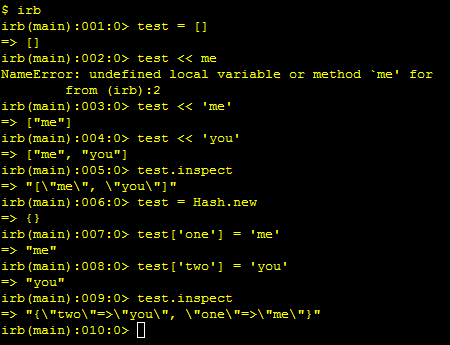
Now lets look at the same ruby code.

multiple assignment of array to variables in ruby

You can see that when we do an assignment of

x = y = z = []

ALL the variables point to the same array, so changing one item, changes all the other variables!

This is because arrays, hashes and certain objects are passed by reference not by value.

I say “certain” objects because the assignment

var1 = var2 = "you"

… doesn’t work the same way - as you can see above - even though the quoted string “you” is an object in Ruby.

So be careful PHPsters … this cost me a couple of hours in my project.
Hopefully you can skate around this one if you come across it.

Add comment April 29th, 2008

Problems with PHP4 and PHP5 sessions not working? … you may be using numeric keys!

I have just blown 4 - 5 hours on this “feature” of PHP and I thought someone else would care to know.

You can’t use numeric keys for sessions in php!

so stuff like

$_SESSION['1234']  = ‘boo”;

… won’t work because PHP’s session handling mechanism simply refuses to store that particular session variable.

Even worse, it fails silently, leading you to think your brain has fried itself.

Personally, I just thought something funky was up with PHP5 (google searches seemed to indicate problems with PHP5 sessions, so I focused on that).

But after trying version 5.2.4, 5.1.6  and still having the same problem I finally tried it out in PHP4 and … still had the problem. Then I seriously started trying to track down the bug.

After finally finding it and writing the right Google query  (thanks for nothing Google :|) … I found a couple of articles that point out this problem.

So I’m writing this with an SEO’ed title that should hopefully grab the right folks, before they blow hours trying to figure this out.

Please go and vote for this feature to be fixed (made to fail loudly … so you know exactly what is wrong).

Add a comment if you do.

Add comment March 27th, 2008

Why query strings in urls drive Googlebot and other search engine crawlers insane

“We have to reinvent the wheel every once in a while, not because we need a lot of wheels; but because we need a lot of inventors.”
- Bruce Joyce

I wrote about my experience writing a site crawler in php in an earlier post, and I’m going to use some of the background there to make my point here. So it might help to go read it if you haven’t already.

[Google’s crawler [Googlebot] isn’t that sophisticated/writing a crawler in php]

From my casual observation of the way Googlebot crawls some of the sites I work on, I have reached the conclusion that it works in much the same way that a crawler I wrote a year ago worked.

Google bot goes page to page, gathering links from your page and tacking them onto the current url that it is at, right then. So why do query strings give it such a problem?

The answer is simple. Imagine this url for an item that doesn’t exist anymore.

www. example.com/store.php?buyid=29&catid=12

When a crawler encounters this url and tests it to see if it returns a 404 … it doesn’t.

Why?

Because  www. example.com/store.php is usually still a valid page. It  won’t give the crawler an error, unless you explicitly code it to.

So the crawler now tosses  www. example.com/store.php?buyid=29&catid=12 onto its list of pages to be crawled. Can you see the disaster waiting to happen?

www. example.com/store.php?buyid=29&catid=12 and any other non-existent urls like it are basically just mapping to the still valid www. example.com/store.php but in the crawlers mind they are all different urls.

Now , if there are other urls on that page (store.php), like for related products for example. Google just takes the url and tacks it on to the url (it thinks) its at right now. So it winds up with

www. example.com/store.php?buyid=29&catid=12store.php?buyid=39&catid=11

It does that for every invalid query string url that has store.php in its base. It then goes back and crawls them again and now it has.

www. example.com/store.php?buyid=29&catid=12store.php?buyid=39&catid=11store.php?buyid=39&catid=11

The crawler is now in a tailspin … going around in circles trying to crawl your site. Chewing up your cpu cycles and generally being a nuisance.

I hope this helps you understand why Googlebot hates query strings so much.

I haven’t tried this yet, but I think it should be clear that making the base url of a query string  resolve to a 404 error will help it out a lot.

So as an example

www. example.com/store.php?buyid=29&catid=12 

should return a code 200/ok

and

www. example.com/store.php

should give a 404 error.

This is just my theory, I don’t know that It’d be practical.

PS: I hope this further helps you understand why search engine crawlers also hate PHP session ids on your content.

Add comment February 8th, 2008

Google’s crawler [Googlebot] isn’t that sophisticated/writing a crawler in php

I spent a lot of time early last year, trying to write a crawler in php (I know, I know).

It was supposed to sit on the server and when so that when you went to the url, it’d generate a google sitemap for your entire site.

What I found out was that writing a good crawler is very hard work. Not because of the recursion involved, but because of the infinite ways link tags appear.

Now Google has validated my experience (more on this in a second).

Just a couple of things I had to consider with my crawler were

  • I had to program it to look for a base tag so that I’d know if to treat the links as relative or absolute.
  • I had to check each link to figure out if it was an internal or external link so I’d know whether to crawl it.
  • Then I had to keep a running list of links crawled, so that I’d know if I had crawled a link before or not
  • I had to let the program know that if there was a “/” in a relative link, to let it know to substitute the domain for it.
  • knowing how to deal with “../” … this was a pain and a half
  • I had to let it know how to deal with mailtos, javascript, and improperly written urls like <a href=”www.concept47.com”> (more on this later) … etc

My crawler worked by gathering a list of links that it continually added urls to be crawled onto. As it crawled the urls, it put them in another array that each new url had to be crosschecked with before being added to the list to be crawled.

The problem  though,  is the way people write html markup. As many of you know, there are some nastily written pages out there … so if someone wrote <a href=”www.concept47.com”> or <a href=”concept47.com”> or even <a href=”screwyougoogle”> my crawler had to know not to add it to the list to be crawled.

This is very difficult to do correctly and for all the time I spent on it, there is no real way to deal with it. You could write special cases for <a href=”www.concept47.com”> but what about <a href=”ww.concept47.com”> or
<a href=”w.concept47.com”>  … see the problem?

Even though the urls give you a 404, they’ll make it onto your list to be crawled and waste the crawlers time. I felt like such a loser for not being able to figure out this issue, but it seems the Googlebot has the same problem.

Look at this. [click the image to make it bigger]

Googlebot has problems with bad link tags

This is from my webmaster tools console.

The problem here was that I had a link tag on one of my blog posts that went like this

<a href=”www.unfuddle.com”>

As you can see, even the mighty Googlebot didn’t pick up on the error. It just tacked the url onto the current url, it was at and went on about its business.

Validation!

Read the next in this series [Why query strings in urls drive Googlebot and other search engine crawlers insane]

Add comment February 8th, 2008

Why php_value directives for php.ini set in .htaccess fail when php is running as cgi or fcgi

I was trying to take advantage of PHP5’s new auto_prepend_file directive today, by using the php_value directive to set it in a .htaccess file. But as soon as I did that, my cheerfully running application puked and died, with the familiar message.

“Internal Server Error
The server encountered an internal error or misconfiguration and was unable to complete your request”

I had seen this behavior before, when I was writing an app for a client a few months ago, but I hadn’t had time to investigate it. Today I decided to go a-googling and I promptly found my answer

Those are Apache directives, but in CGI mode Apache calls the php binary, which turn reads php.ini. Since the binary doesn’t read httpd.conf it has no effect on PHP. As PHP isn’t loaded into Apache, Apache doesn’t know what to do with the directives and borks.

Add comment February 5th, 2008

How to run both mysql5 and mysql4 on the same windows Machine.

I finally made the jump from mysql 4 the other day, to take advantage of mysql’s new “INSERT … ON DUPLICATE UPDATE” command (which I think is spectacular by the way).

I didn’t want to actually upgrade from mysql4 to mysql5, just run the two mysqls side by side … so I looked around for a bit and figured out that all you need to do is get both  servers running on different ports. The trick is to remember to reference localhost:port (eg: “localhost:3307″) instead of just “localhost” whenever you connect to it, in php, for example. Below are screenshots of the things you need to watch out for when doing this on a windows machine.

The first part of the install is pretty straight forward, just make sure to install it into a different folder than your current mysql install.

At this screen be sure to tick the “Configure the MySQL Server now” box

Mysql5 configure the Mysql server now

At this screen pick “detailed configuration” and continue on …

Mysql5 detailed or standard configuration screen

mysql5 configure the mysql server 5.0 server instance

Mysql5 InnoDB Tablespace Settings

At this screen be sure to change the port number.

mysql5 please set the networking options

From the dropdown pick a service name that won’t conflict with the name of the service for the current MySQL install.

mysql5 set the windows options

mysql5 configure the mysql server 5.0 server

After that is all done, we want to try and connect to our brand new server. So fire up MySQL Administrator or MySQL query browser and create a new connection, like so … (Yes. I know running as root is bad for you … thanks).

mysql query browser new connection

Once you’re done … connect to MySql Query browser and you should go to this screen! The nice thing about this is that you can probably even run mysql 4, 4.1 and 5 all together.

voila … connected

Add comment February 4th, 2008

A lesson in PHP’s design and why its deployment model “just works”

Ian Bickings’s “What PHP Deployment gets right

This is a wonderfully written article on how PHP works, and the funny thing is that Ian seems to be more of a Python guy than anything. Needless to say, I learned a few things from reading this …

  • What people don’t realize is that PHP is effectively a CGI model of execution. People don’t appreciate this because PHP is implemented with mod_php, an Apache module. There are many other modules like mod_perl (the first of these mod_language modules), mod_python, mod_ruby, etc. None of these other modules are like mod_php. This has led many a commentator astray because they don’t get this. This is because the PHP language was written for mod_php. Perl, Python, Ruby — none of them were written to be used as an Apache module. You can’t take one of these existing languages and just retrofit it to be like PHP or like mod_php.

  • PHP processes can leak memory like crazy. It doesn’t matter because they only leak memory for one request.

  • This one helped me understand why Ruby On Rails and its fast-cgi implementation is so slow —->.

    Most of the language (PHP) is implemented in C, in a shared library. In comparison Python has “batteries included”, but those batteries are largely written in Python. Python code is not shareable, and can take time to load up. So while a single Python CGI script might be small, it probably imports lots of code which would have to be loaded each request. PHP scripts actually are small. (Stuff like PEAR changes this by adding substantial libraries written in PHP, but also seriously effects PHP performance.)

Add comment January 20th, 2008

fully commented and explained Xdebug.ini

For all you php debuggers out there losing time looking up xdebug settings in xdebug’s difficult-to-look-up documentation …
now you have this …

A well documented and well commented xdebug.ini by Gaetano Giunta.

Add comment December 7th, 2007

How to solve problem with USB devices not responding on resumption from standby in Bootcamp.

So … I’m running Windows XP on a 17″ Macbook Pro with Bootcamp …
Every now and then, when I put the laptop on Standby and try to resume work from where I left off, the USB devices stop responding all together.
This is a big problem for me, since

  • I put my laptop in and out of standby several times a day
  • work off an external 250GB Hard drive.
  • am pretty hopeless without a wireless mouse

I poked around online, but didn’t really find anything on Google or at the Apple bootcamp forum.
So I decided to try fixing it on my own.

What I found curious about the problem, was that everytime the usb devices stopped working, I’d get this message in the Event Viewer.

Timeout (30000 milliseconds) waiting for a transaction response from the AppleOSSMgr service.

So I simply restarted the “Apple OS Switch Manager” service and after allowing it to complete … it would fail, but my usb devices would be operational again.
Here’s how to accomplish it, and I hope this helps someone out.

From the command line

  • Hit the Apple btn + R  … the run prompt should come up
  • type in “cmd
  • type in [net stop "Apple OS Switch manager"] (note the quotes)
  • wait for that to complete
  • then type in [net stop "Apple OS Switch manager"]

Visually

  • Hit the Apple btn + R  … the run prompt should come up
  • type in “services.msc
  • scroll down until you find “Apple OS Switch Manager” (sort the columns by name to help you find it a bit more easily)
  • Right Click on it and select “Restart
  • wait a while … it will take a bit of time to complete and it should actually fail, but after its done you should be able to use your usb device again.

Add comment December 7th, 2007


Recommended

Posts by Category

Calendar

October 2008
S M T W T F S
« Sep    
 1234
567891011
12131415161718
19202122232425
262728293031  

Posts by Month