How to uninstall a plugin in Rails
February 17th, 2009
This one is simple, but I couldn’t find a decent google result for it.
Before you uninstall the plugin, you have to get its name … go to the vendors directory in your app folder and get the name of the folder
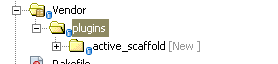
In this case the name of the plugin is “active_scaffold”
Go to the directory of the app you want the plugin removed from and type in
ruby script/plugin remove active_scaffold
or if you’re on a Linux box
./script/plugin remove active scaffold
Entry Filed under: ruby on rails

2 Comments Add your own
1. Nnanna | February 25th, 2009 at 10:23 am
Or you can just delete the folder
2. admin | February 25th, 2009 at 6:46 pm
True … but *some* plugins have database altering calls in install.rb that you would not be able to cleanly roll back if you did just that
Leave a Comment
Some HTML allowed:
<a href="" title=""> <abbr title=""> <acronym title=""> <b> <blockquote cite=""> <cite> <code> <del datetime=""> <em> <i> <q cite=""> <strike> <strong> <pre lang="" line="" escaped="">
Trackback this post | Subscribe to the comments via RSS Feed