If only more github gem/plugin installation docs were like this
Monthly Archives: February 2009
How to uninstall a plugin in Rails
This one is simple, but I couldn’t find a decent google result for it.
Before you uninstall the plugin, you have to get its name … go to the vendors directory in your app folder and get the name of the folder
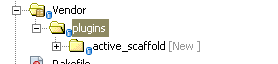
In this case the name of the plugin is “active_scaffold”
Go to the directory of the app you want the plugin removed from and type in
ruby script/plugin remove active_scaffold
or if you’re on a Linux box
./script/plugin remove active scaffold
Cakephp Filter gotcha for rails folks
Usually in Rails, if you specify a before_filter in the base controller ‘ApplicationController’ (in application.rb), every other controller in that app inherits that filter, so that even if you specify a before_filter in another controller … the filter in application.rb always runs
Example:
class ApplicationController < ActionController::Base before_filter :check_login end |
class UploadsController < ApplicationController before_filter :get_data end |
The :check_login method is always run even though UploadsController specifies another before_filter.
(You can stop this behavior by specifying a skip_before_filter :check_login in the Uploads Controller)
However if you take this mindset with you to cakephp Continue reading
How to get a hasMany dropdown/select tag in cakephp
Getting a dropdown of items a model hasMany of, should be very easy to do, but I always forget and it takes me far longer to find it than it should.
For this brief example, we’re assuming that we have an Uploads model and a FileCategory model.
Uploads belongs to FileCategory and File Category has many Uploads … get it?
class Upload extends AppModel { var $belongsTo = array('Client', 'FileCategory'); } class FileCategory extends AppModel { var $hasMany = array('Upload'); } |
All you need to do to is get the items for the dropdown with a find(‘list’) command and then Continue reading
Cakephp gotcha: Don’t name controller the same as folder in webroot
This one had me going for a bit, but if you name a controller the same as a file that is in the “webroot” folder, and try to navigate to it, cake will just show you a listing of all the files in the same named directory.
As an example, the “files” folder comes with the cakephp installation right?
Not knowing that, I tried to build a files controller and navigate to it.
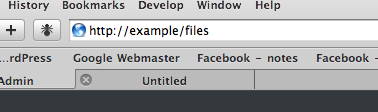
but it takes me instead to Continue reading
json_encode error “missing ] after element list” with jquery json plugin
If you’re using the excellent jquery json plugin you might run into problems trying to parse json returned from the php function json_encode.
Specifically, when you try to parse the returned json using $.evalJSON you get the javascript error
missing ] after element list
I also had this same problem with the cakephp json component (which I decided to use instead since it would be more portable across php versions than the php5.2+ only json_encode).
The simple fix is this.
Add slashes to your output and surround it with double quotes like this …
$status = json_encode($status); echo '"'.addslashes($status).'"'; |
I figured this one out, by examining rails json output that worked just fine with the jquery json plugin.