Archive for March, 2008
Thanks for Justin Cook for doing all the leg work on this one.
All you have to do is create a new table from the old one, which filters out the duplicate entries
1
2
3
| CREATE TABLE new_table AS
SELECT * FROM old_table WHERE 1
GROUP BY [colum_to_remove_duplicates_from]; |
so as an example
1
2
| CREATE TABLE news_new AS
SELECT * FROM news WHERE 1 GROUP BY [title];<!--more--> |
Now you just have to go in and rename the news db to news_old (for the newbies to this … don’t drop the table immediately, at least until you’re sure the new one works fine).
Then rename news_new to news
Phpmyadmin should make all this easy (click on the “Operations” tab), but in case you are working from the console, here is the syntax you need to know
1
| RENAME TABLE new_table TO old_table; |
That isn’t all that you have to do, however. The new table will be missing its primary key and auto increment settings as well as any other indexes that you may have had on the old table.
Go in and set the primary key (first) back on the column that had it, then (secondly … the order matters) clear out the default value on it and set it to auto increment.
You can re-add your indexes later … be sure to put a unique index on the column you were having trouble with.

March 27th, 2008
I have just blown 4 - 5 hours on this “feature” of PHP and I thought someone else would care to know.
You can’t use numeric keys for sessions in php!
so stuff like
$_SESSION['1234'] = ‘boo”;
… won’t work because PHP’s session handling mechanism simply refuses to store that particular session variable.
Even worse, it fails silently, leading you to think your brain has fried itself.
Personally, I just thought something funky was up with PHP5 (google searches seemed to indicate problems with PHP5 sessions, so I focused on that).
But after trying version 5.2.4, 5.1.6 and still having the same problem I finally tried it out in PHP4 and … still had the problem. Then I seriously started trying to track down the bug.
After finally finding it and writing the right Google query (thanks for nothing Google :|) … I found a couple of articles that point out this problem.
So I’m writing this with an SEO’ed title that should hopefully grab the right folks, before they blow hours trying to figure this out.
Please go and vote for this feature to be fixed (made to fail loudly … so you know exactly what is wrong).
Add a comment if you do.
March 27th, 2008

March 25th, 2008
This is very straight forward, but for those who think it might be complicated. Here is all it entails.

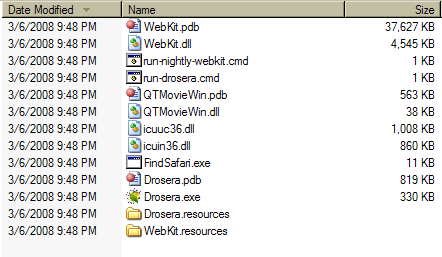
- you should see a screen like this pop up and shortly after Safari should be running with the new webkit engine.

I think you might require Microsoft Visual Studio 2005 to make this work …
It doesn’t seem to make sense for that to be the case, but do post a comment if you get this to run without having Visual Studio installed.
March 17th, 2008
I was working on a Ruby on Rails project with Netbeans today when I went to fire up webbrick to test something in the app.
I immediately got an error like this
=> Booting WEBrick...
=> Rails application started on http://0.0.0.0:3000
[2008-03-18 16:36:59] INFO WEBrick 1.3.1
=> Ctrl-C to shutdown server; call with --help for options
[2008-03-18 16:36:59] INFO ruby 1.8.6 (2007-03-13) [i386-mswin32]
[2008-03-18 16:36:59] WARN TCPServer Error: Bad file descriptor - bind(2)
C:/ruby/lib/ruby/1.8/webrick/utils.rb:73:in `initialize': Bad file descriptor - bind(2) (Errno::EBADF)
from C:/ruby/lib/ruby/1.8/webrick/utils.rb:73:in `new'
from C:/ruby/lib/ruby/1.8/webrick/utils.rb:73:in `create_listeners'
from C:/ruby/lib/ruby/1.8/webrick/utils.rb:70:in `each'
from C:/ruby/lib/ruby/1.8/webrick/utils.rb:70:in `create_listeners'
from C:/ruby/lib/ruby/1.8/webrick/server.rb:75:in `listen'
from C:/ruby/lib/ruby/1.8/webrick/server.rb:63:in `initialize'
from C:/ruby/lib/ruby/1.8/webrick/httpserver.rb:24:in `initialize'
from C:/ruby/lib/ruby/gems/1.8/gems/rails-1.2.3/lib/webrick_server.rb:58:in `new'
... 7 levels...
from C:/ruby/lib/ruby/gems/1.8/gems/rails-1.2.3/lib/commands/server.rb:39
from C:/ruby/lib/ruby/site_ruby/1.8/rubygems/custom_require.rb:27:in `gem_original_require'
from C:/ruby/lib/ruby/site_ruby/1.8/rubygems/custom_require.rb:27:in `require'
from script/server:3
I did a quick google of the error, and the general consensus was that something was blocking port 3000.
But when I used the “netstat” command at the command line, I didn’t see anything on the port …

I was scratching my head a bit, but I went in to look at what processes were running and I discovered this ruby process …

Remember, webrick wasn’t running at this point, because it kept erroring out.
I figured that this was my problem, and on further prodding with Process Explorer, I found …

So I just killed the process and all was well with the universe

March 13th, 2008
Life is too short not to have garbage collection …
- Awesome quote from a developer Jon Cooper who I was talking with at SxSWi.
He was talking about writing code in .NET and coding speed reliant modules in C++ or C.
March 11th, 2008
This sesssion was pretty much standing room only and I came in 15 minutes late.
I didn’t get to really settle in and pay attention as I’d like, so I’ll have to view the slides later (I’ll link to them because they were really frickin’ great)
This jumps around a bit, as I’m writing from memory.
- They talk about memory leaks in IE, I dunno if the newly released Jscript 5.7 addressed what they were talking about
- There was this very interesting part of the talk where they talk about being able to access dom elements using Xpath.
- Apparently Xpath is faster in situations where you want to get all divs of class foo (for example)
- With Xpath … the engine just goes and gets them, with dom it gets all the divs, then loops around and gets the ones you want
- This can be slow when you’re dealing with a lot of elements
- Dojo and prototype support using XPath … jquery (my darling) doesnt.
- Only Mozilla and Opera support this (Webkit/Safari 3 finally added it) of course microsoft is miles behind … poor poor Microsoft
- They talked about trying to isolate bugs to a line of code if preferable, when sending in bug reports
- gzipping your javascript is better than “packing”
- Make sure to set content headers to cache your javascript correctly
- Computing the width of elements is tough because it is hard to know what dimension you want exactly (with padding? margins? without?
Another great session.
March 11th, 2008
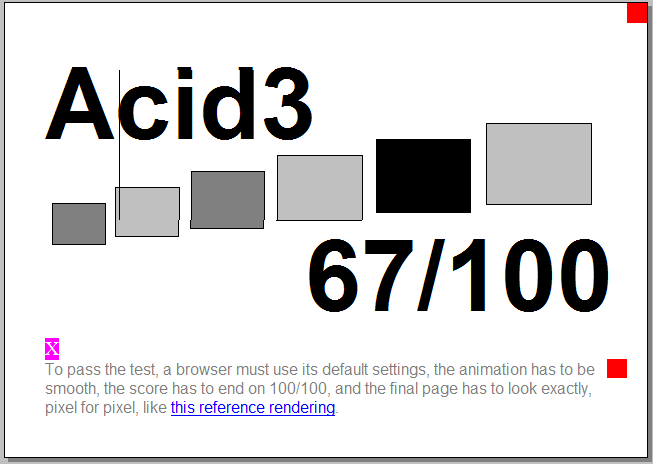
Browsing is noticeably faster … and my life is now made exceedingly difficult trying to choose between FF3, Opera 9.50 and Webkit …

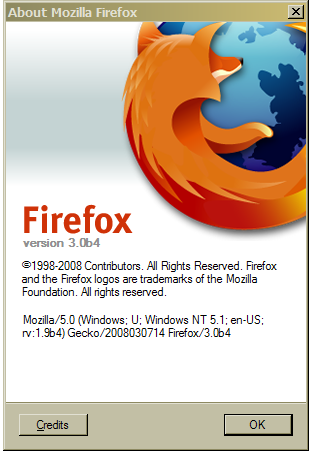
And now Firefox 3 beta 4 also now scores a 67 on Acid 3.
Still behind the Webkit nightlies though

March 11th, 2008

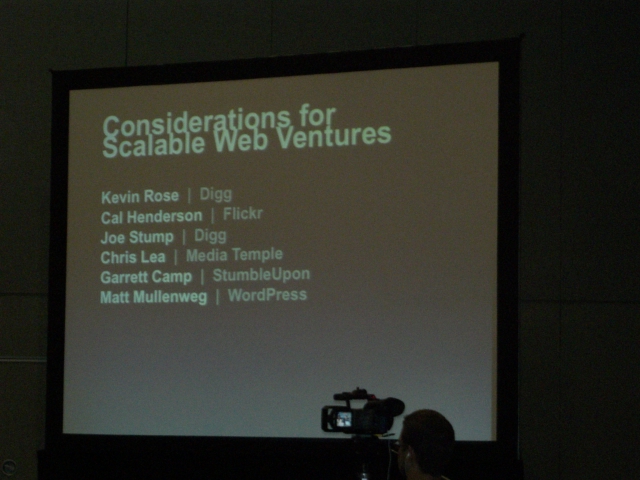
Panelists
Kevin Rose | Digg
Cal Hendersen | Flickr
Joe Stump | Digg
Chris Lea | Media Temple
Garrett Camp Stumble Upon
Matt Mullenweg | WordPress
{Discussion: Kevin seems to be moderating}
- Consensus is that you think about scaling when you get there
- Joe Stump says that it (not worrying about scaling initially) helped them concentrate on building cool features
- Software load balancers suck … Squid is highly recommended
- Pound is good for http load balancing
- Joe Stump says that at 15 million pageviews you should start thinking of specializing servers (images, db, static files … that sort of thing)
- Wordpress uses mainly rented server boxes …. 1000 of them (didn’t know that)
- Cal from Flickr says that engineering time is expensive and that if you can just solve the problem by throwing money at it … then you should.
- They recommend that when your development staff grows past 2 people that someone be appointed to standardize code (underscores vs Camel Case)
- TRAC is brought up by Stump … use it if you
- Lea says to document your code. Its actually a monetary issue, time spent figuring out code is time not coding, if you can reduce that you save money.
- Cal cracks a really great joke “What is this documentation thing you speak of?” … “seriously … just hire people that agree with you”
- Question comes up about remote workers … Kevin says that at one point they didn’t care … they hired a guy from the East to help digg scale.
- Matt says his people don’t see each other for months and they get together usually for social purposes more than anything
- Says they are trying to get to a stage where they have users clustered in certain cities.
{Floor opened for questions}
Q: What bottlenecks do you guys usually encounter
- If its not your db then its your file storage (NFS etc) … Cal concurs … says its almost IO … “With a teeeny bit of foresight … you can avoid that” Love this guy!
- Talking about digg architecture … Joe Stump says digg db has 200 tables but only about 2 are problem children
- says one of them has about 200 million records … and the two get the highest 2 read and write requests
- Stump says that your language never matters … Cal chimes in “Unless its Ruby” … the crowd roars in appreciation!
- PS:not sure where this fits, but there is a discussion about how their admin tools are usually not very well done. Joe says that whenever something goes wrong with digg, they usually check with the Admins first to see if they’ve screwed with anything.
Q:recommended software
- Cal says use Ganglia for graphing, puppet for admin. Lea suggests Unin for graphing. Cal says Ganglia and unin are almost the same. LVS comes up.
Q: How do you keep the community from becoming obnoxious
- Kevin talks about giving the community the tools to moderate themselves, talks about the success of the “bury” option.

Q: About source control
- They do pushes at digg from once a day to 45 times a day, but Rose says officially they’ll be pushing twice a month.
- Joes suggests that when you’re ready to push live, you should freeze your code and create a new branch
- This way when something breaks, you can fix the code in the branch and push it live from there.
Q: asks about what they do when they can’t have a local development environment
- Cal says they can’t support a local dev environments because its just too complex, too many moving parts. They just use dev servers. Everyone on the panel concurs.
- Cal: Talks about how Flickr lives on memcached and Squid, suggests taking a look at Varnish if all your stuff is in memory. Says that they have 32,000 requests per second for images.
- Joe: Says they cache things like user objects containing user data (because users barely alter their info after they first get set up)
- Matt: Talks about the use of output caching … says that if you’re getting 20 million page views then caching pages for, say one second, can take you down to about 8 million or was it 800,000 …
- Joe: Talks about queuing. Says that when a user diggs something, they just cache it for that user so it shows up dugg, but they queue it. So a digg might not get into the databases for a few minutes.
- Digg uses gearman for queuing. Cal talks about a “ghetto queue” of cron and mysql to implement queuing. Joe says that’s “housing projects” bad.
Q: about API’s
- I love Cal! He says that there’s something about something about API’s that brings out the stupidity in people. They just try to suck down all your data as fast as possible … where they wouldn’t try to do that with a regular web page. He says that implementing a throttling system is a good idea, to avoid getting creamed by idiots. Did I mention that I love this guy!
Q: any good documentation for using the tools they recommended
- Answer: A resounding NO. Joe says 90% of what he’s learned with open source is by trial and error.
Definitely Worth the price of admission!
March 11th, 2008
Today was terrible … the weather was nasty (cold and rainy) and I forgot my badge at home.But one of the more interesting panels was the Design Eye for the South By.
In it a group of designers, got together to redesign the current SxSW website. I really loved the concept they came up with, which was to personalize the site for each user and throw in a social networking component to it, sounds cliche but read on …
For example, you’d log in and the navigation would look something like this
PEOPLE | EVENTS | PARTIES
Which really encapsulates the main things you come to SxSW to do
- meet people
- go to events/films/shows
- go to the parties to network
On the events page, you could add events to your schedule. And on the parties tab you could pick parties you were interested in. The parties all came with Google maps too. I thought it would have been cool if they had something like that for the events … to help you find the rooms for each one. But they did the thing for free, so one can’t be picky.
What I really liked was that because of the social networking component, you would login and be able to find people you met and “friend” them.
Then you could view their profiles and see what events they were attending or what parties they were going to be at. Usually (people won’t admit it) that actually affects your choice of the things you’re going to see or parties you’re going to go to.
Of course my imagination started to run wild at this point. Say you were stuck in a sleep inducing session, you could hop online and link directly to a friends meebo chatrooms of his/her session, to see whether theirs was more interesting, and make the gametime decision about whether to ditch your session for theirs.
I also thought It’d be cool if you could just keep your profile and re-use it every year for registration and payment etc …
The whole presentation was very good natured and funny, and the design was very simple but effective.
Hopefully SxSW takes them up on their design offer, because adding events to my SxSW schedule, they way the have it currently, is a pain and a half.
The results of their work will be posted at Designeye.org
March 10th, 2008
Sitting in the 37 signals presentation. They’re going to tell us about the lessons they’ve learned over 10 years being in business.
I’d guesstimate about 1000 - 3000+ people in the auditorium.
Here’s what they say …
- Don’t worry about the unknown:
Point here being, don’t worry about trying to build something that takes care of every single scenario. Do what works now and change later. Optimize for now
- Red Flags:
I didn’t know that half the 37 signals team was remote … apparently 5 of them are based out of Chicago and 5 are other places
They talk about the things we say that can be detrimental to the team … simplified
Only: It’ll only take a few hours right?
Can’t: We can’t launch without it
Need: We really need it.
Easy: Hey Sam can you take care of this by Friday … it should be easy right?
Fast: Can you take care of this real fast.
- Be successful and make money by helping others be successful and make money
- Target nonconsumers and nonconsumptions
A nonconsumer is someone who has a problem but the solutions for the problem basically suck.
This is an opening for you as an entrepreneur to go in and solve their problem.
The upside is that the entrenched players who suck at solving this problem won’t try to fight you on it, you fly under the radar … picking up loose change.
- Question your work regularly
Why are we doing this?
What problem are we solving?
Is this actually useful?
Is there an easier way?
- Fix your copy
The “internets” is inundated with crappy copy writing … that directly affects the way your user views your app.
Consider a rewrite of the site first, before a redesign.
- Err on the side of simple
Start with the easy way first. Use craigslist before Monster. Rewrite just that module, not the entire app.
The longer you sit on something, the less likely you are to launch it.
- Invest in what doesn’t change
What works today and will work ten years from now.
Google invests in speed and better search results. Amazon invests in fast shipping.
For 37 signals, its investing in simple software. What is it for you?
- Share
Share what you know. That way you become an expert and people come to you.
(I had a problem with this one … and think its only true to a certain extent)
- Minimize interruptions (they kill productivity)
Joel Spolsky has talked about this before in one of his posts. But being close to someone gives people the tendency to interrupt each other.
“Hey … check this out?”, “Lets have a quick meeting”
This wastes time and kills productivity … people need blocks of time to work through.
Think of more passive communication like IM or instituting “no-talk” blocks of time
- Roadmaps send you in the wrong direction
They lock you into a path.
“Its OK to think about the future, just don’t write it down”
- Be clear in crisis
People just want to know what is going on. So be open, honest, public and responsive.
- Make tiny decisions
Achievements build momentum. When you make small decisions, you can’t make big mistakes.
- Make it matter
Be passionate about what you do.
Respect your time … don’t waste it on stuff that doesn’t matter.
March 8th, 2008
Woohoo!! First full day of SxSWi.
Missed the morning sessions but got in to see a sneak peak of Expression Engine 2.0 (latest version 1.6).
Its hard to describe, but version 2.0 is amazing, almost everything has some kind of neat little effect on it. Things seem to be organized in a very different (but seemingly more intuitive) way from most other CMS’s. And I mention that it looks gorgeous … completely web 2.0′ed out.
I’ve never been a fan of Joomla, but it looks like the folks from Ellislabs have a winner on their hands.
Its that good.
No word when it’ll be out though.
March 8th, 2008
I am a huge fan of Safari and Webkit … what it lacks in cool features, it more than makes up for in blazing fast speed and javascript performance.
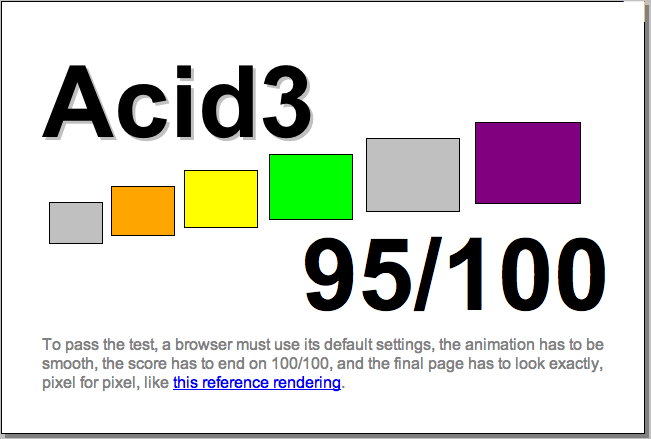
When the Microsoft released a beta for IE8, I was prompted to run the Acid3 test on the browsers I had on my system.
Here are the results I got on my windows box, testing all the installed browsers against Acid 3
[I got the Safari seed off the Apple Developer Connection]
Safari (seed 31A15) ……………………………… 76
Opera 9.50 build 9613 ………………………… 65
Opera 9.50 build 9815 ………………………… 60
Firefox 3 beta 3 ………………………………….. 47
IE 7 …………………………………………………….. 12
I posted this on an Apple Discussion board and was told by a member to test the latest nightly (30881) … which I did.
The result?

March 7th, 2008
Segoe UI.
How do I know this and why am I posting it? Read on …
A long time ago, I installed about 833 fonts on my system. But over the years, I came to realize that a lot of the fonts were crap, looked exactly alike or were never going to be used.
So I grabbed the excellent font management software, The Font thing, and cleaned up shop. Whittling down my font count down to 300+.
Tired (it took an hour and a half), I went to use my email program (Windows Live Mail) . That was when I realized the fonts were bolded … everywhere. I knew instantly that I had deleted the font that it was using for its UI.
Windows Live Mail was trying to compensate by using the only version of the font it could find, which was the Bolded version. If I had deleted all of the font (bold, italic etc), it would probably have defaulted to an entirely different font … and given me a painful headache.
I thought for a couple of days about how I would find the font, without going through all my installed font faces to find one that had a bold version, but no normal version.
Eventually realizing that the font that Live Mail uses, isn’t a standard system font … I figured that if I sorted the Fonts in the C:\Windows\Fonts folder by “Date Modified” … the font I was looking for would be at the top of the list.
I did the sort … and sitting right there was a Segoe UI Bold … with no normal version. (Usually there is an italic, bold and bold italic version of a font).
I moseyed on down to my trash can, found the corresponding Segoe UI fonts … restored them and all was well with the universe
But I made this post, just in case someone … somewhere ever has the same problem …
Segoe UI … that’s your answer!
March 6th, 2008
Microsoft is definitely trying hard to keep pace with Firefox, Opera and Safari.
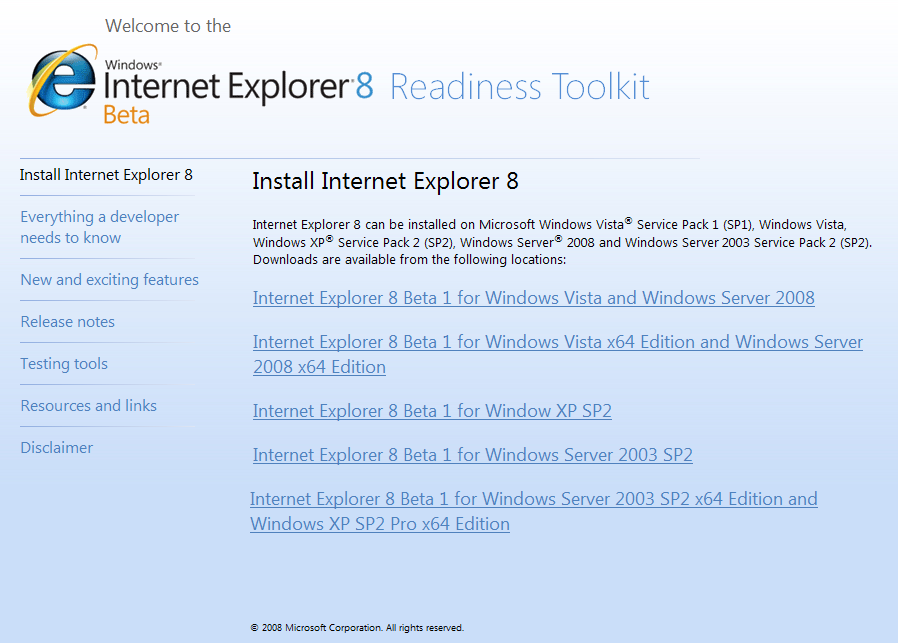
It has released a beta for IE 8

March 5th, 2008
Previous Posts